Skip to product information
1 of 7

A Modern Boomer Guide to Understanding Email Today

A Modern Boomer Guide to Understanding Email Today

Regular price $5.00 USD
Regular price Sale price $5.00 USD
Sale Sold out

52-page visual PDF guide • Full color • Instant download

After checkout, your full PDF guide will be available right away on the thank-you page. We’ll also email you a download link for future access.


Preview before you buy:
Read a free 7-page sample here

Email used to feel simpler.

You opened your inbox, read a few messages, replied when needed, and moved on.

Now email holds receipts, account alerts, newsletters, attachments, password reset links, login codes, order confirmations, appointment reminders, coupons, bills, promotions, spam, and records you may need later.

It can feel like a lot — especially when your inbox fills up faster than you can keep track of it, an important receipt disappears under newer messages, a newsletter keeps coming every day, or an official-looking alert asks you to click a link right away.

This warm, visual guide helps you understand what email is doing today, why inboxes feel more crowded than they used to, and how to approach messages with more clarity, confidence, and calm.

It is not a technical manual, a cybersecurity course, or a demand to organize every message perfectly.

It is about making the modern inbox easier to understand again.

A Modern Boomer Guide to Understanding Email Today is a 52-page full-color digital guide created for older adults, families, and curious lifelong learners who want a clearer, more practical way to understand inboxes, spam, attachments, receipts, newsletters, search, reply-all, and account alerts.

Inside, you’ll find simple visual explanations of modern inboxes, sender lines, subject lines, preview text, attachments, folders, labels, spam, junk mail, newsletters, promotions, account alerts, login codes, password resets, reply, reply all, CC, BCC, forwarding, archive, search, receipts, saved files, and safer email habits.

This guide helps explain:

• Why email feels more crowded than it used to
• Why your inbox now holds more than personal messages
• What sender, subject line, preview text, date, links, buttons, and attachments mean
• What inbox, sent, drafts, spam, trash, and archive are for
• The difference between read, unread, starred, flagged, pinned, and attached messages
• Why a full inbox does not mean you are behind
• When to keep, delete, archive, ignore, unsubscribe, block, or report spam
• Why newsletters, store emails, coupons, and promotions appear so often
• How to understand attachments, downloads, saved files, and PDFs
• The difference between reply, reply all, and forward
• What CC and BCC mean, and why recipient lines matter
• How to find old receipts, appointments, bills, tickets, and account emails again
• Why search can be more useful than perfect filing
• What account alerts, login codes, and password reset emails are for
• How to slow down before clicking links or opening unexpected attachments
• How to tell the difference between marketing, spam, phishing, and real alerts
• What to do when an email feels suspicious or uncertain

What’s included:

• 52 full-color visual pages
• Clear, easy-to-read explanations
• Then-vs-now comparisons
• Myth-vs-reality pages
• “Boomer translation” pages for common email frustrations
• Practical explanations of inboxes, folders, labels, archive, trash, spam, and search
• Pages on attachments, downloads, saved files, receipts, bills, appointments, and records
• Simple explanations of reply, reply all, forward, CC, and BCC
• Guidance on newsletters, store emails, coupons, promotions, and unsubscribing
• Calm safety guidance for links, buttons, phishing, account alerts, and password reset messages
• A one-page summary
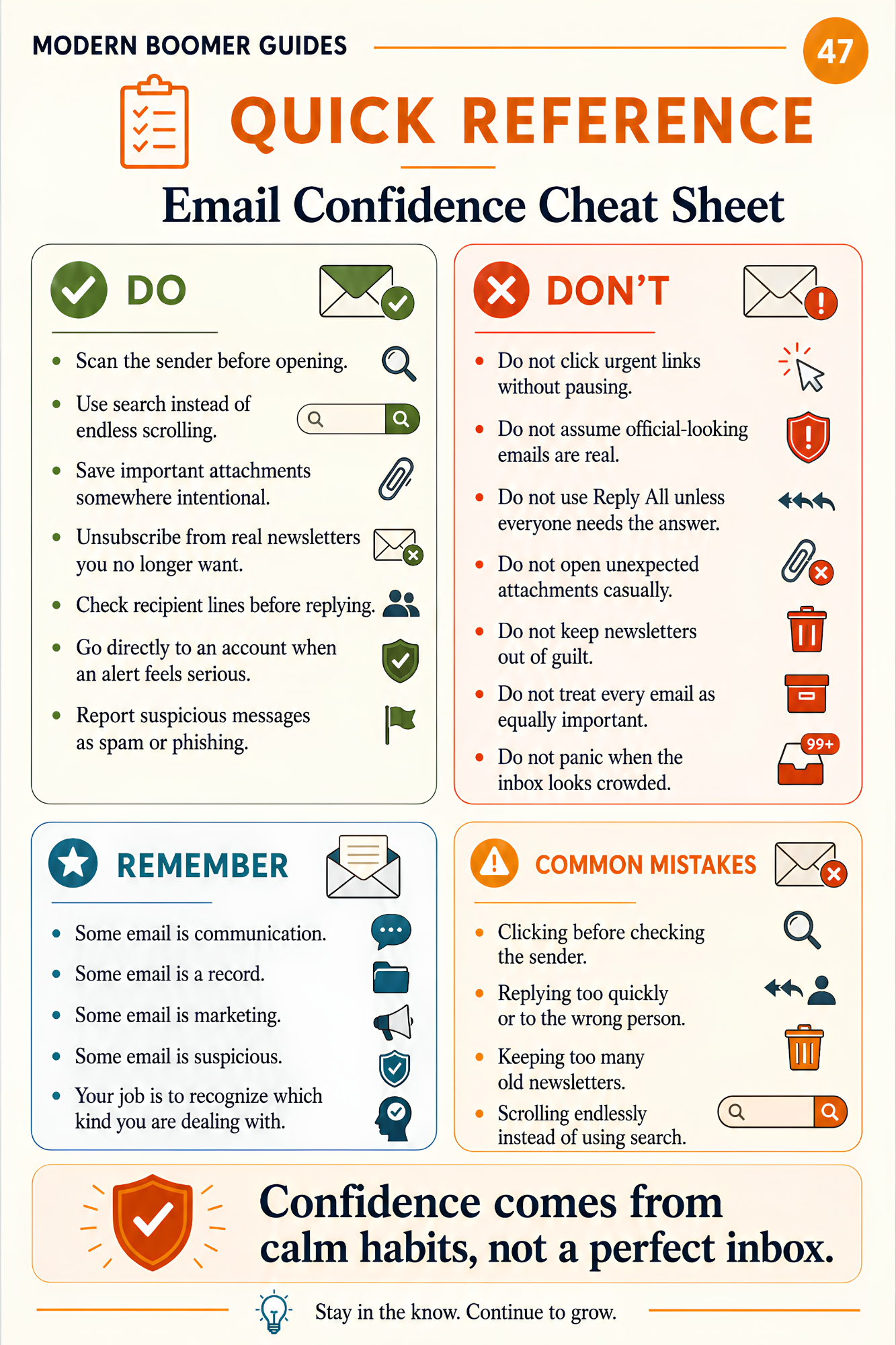
• An email confidence cheat sheet
• A quick-reference page of important email terms

Who this guide is for:

This guide is for older adults, parents, grandparents, and anyone who sometimes wonders:

• “Why are there so many emails?”
• “What is the difference between spam, junk, and promotions?”
• “Should I delete this or save it?”
• “Where did that receipt go?”
• “What does archive mean?”
• “Why do stores keep emailing me?”
• “Should I click this link?”
• “Is this account alert real?”
• “What is the difference between reply and reply all?”
• “Why did everyone see my reply?”
• “What are CC and BCC?”
• “Where did my attachment download?”
• “How do I find an old email without scrolling forever?”
• “How can I feel less overwhelmed by my inbox?”

You do not have to answer every email.

You do not have to organize every message.

You do not have to keep every newsletter.

You do not have to click every alert.

And you do not have to feel behind because your inbox is crowded.

But when you understand the basic parts of modern email, the inbox becomes easier to manage.

You can recognize what kind of message you are looking at.

You can decide what deserves attention.

You can save important attachments somewhere intentional.

You can search for receipts, appointments, bills, tickets, and records more confidently.

You can avoid unnecessary reply-all mistakes.

You can unsubscribe from real newsletters you no longer want.

And you can pause before clicking links, opening unexpected attachments, or responding to urgent account warnings.

What this guide is not:

This is not a step-by-step manual for one specific email app, website, phone, tablet, or computer.

It is not a technical setup guide.

It is not a complete cybersecurity course.

It is not a replacement for professional help with serious account, money, identity, or security concerns.

It is not a demand that you keep a perfect inbox.

And it is not about turning email into another chore.

It is a practical, visual guide to help you understand the everyday parts of email today — so you can read, sort, search, save, and respond with more clarity, patience, and control.

Important note:

This guide is for general education and awareness. It is not legal, financial, cybersecurity, or professional advice. Email scams and account risks change over time, and no guide can guarantee protection from every situation.

If you believe you may have clicked a suspicious link, shared a password, opened a risky attachment, sent money, shared personal information, or lost access to an account, contact the appropriate provider right away.

Download today and start understanding email with more clarity, confidence, and calm.

Stay in the know. Continue to grow.

About Modern Boomer Guides

Modern Boomer Guides creates clear, visual, easy-to-read guides that help older adults make sense of modern life, technology, family communication, and generational change. Each guide is designed to reduce confusion, save time, and support better conversations — one practical page at a time.

Copyright note:

© 2026 Modern Boomer Guides. A Harbor Launch LLC publication. All rights reserved.

View full details